
ListView
A ListView is like a ScrollView but it should have a for element, and the contents are
automatically laid out in a list.
In a ListView, elements are only instantiated if they are visible, which guarantees stable performance with a practically unlimited number of items. ScrollView is more suitable for free-form content.
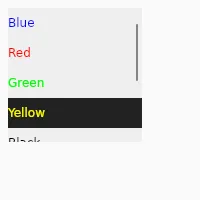
import { ListView, VerticalBox } from "std-widgets.slint";export component Example inherits Window {    width: 150px;    height: 150px;
    VerticalBox {        ListView {            for data in [                { text: "Blue", color: #0000ff, bg: #eeeeee},                { text: "Red", color: #ff0000, bg: #eeeeee},                { text: "Green", color: #00ff00, bg: #eeeeee},                { text: "Yellow", color: #ffff00, bg: #222222 },                { text: "Black", color: #000000, bg: #eeeeee },                { text: "White", color: #ffffff, bg: #222222 },                { text: "Magenta", color: #ff00ff, bg: #eeeeee },                { text: "Cyan", color: #00ffff, bg: #222222 },            ] : Rectangle {                height: 30px;                background: data.bg;                width: parent.width;                Text {                    x: 0;                    text: data.text;                    color: data.color;                }            }        }    }}
slint
Properties
Section titled “Properties”Same as ScrollView.
Callbacks
Section titled “Callbacks”Same as ScrollView.
© 2026 SixtyFPS GmbH